
Amazon's 1099-K shows gross unadjusted sales in Box 1a — not what hit your bank account, not your revenue after fees, and not even close to what QuickBooks probably shows as Amazon income. Instead of scrambling every January to explain a five-figure gap between the form and your books, build a reconciliation workflow now so the number on your tax return matches the number the IRS already has on file.
- Amazon's 1099-K reports gross unadjusted sales in Box 1a, not net deposits — reconcile against Seller Central reports, not your bank statement.
- The federal 1099-K reporting threshold drops to $600 for 2026, down from $2,500 in 2025 and $5,000 in 2024, so more sellers get one this year.
- Match Box 1a to Product Sales plus Shipping Credits plus Sales Tax Collected from the Date Range Transaction report before touching your books.
- Amazon fees, refunds, and chargebacks are NOT subtracted from Box 1a — book them as separate expense lines, never netted against revenue.
Why this matters
The IRS gets a copy of your 1099-K the same day you do. If Box 1a says $184,300 and your Schedule C or 1120-S shows $151,900 in gross receipts, that $32,400 gap is exactly the kind of mismatch that triggers a CP2000 notice 18 months later. Amazon seller 1099-K reconciliation is not optional bookkeeping hygiene — it's the difference between an audit letter and a clean file.
Most sellers get tripped up because they assume the 1099-K works like a W-2: net, final, done. It doesn't. Box 1a is the sum of every dollar a buyer paid through Amazon, including sales tax Amazon collected and remitted on your behalf under marketplace facilitator laws in most states you never touch. Fees, refunds, and chargebacks come off later, on your books, not on the form.
Before you start
- Seller Central admin access — you need permission to pull reports from Reports > Tax Document Library and Reports > Payments > Date Range Reports. A read-only user role often can't export these.
- A full year of books already categorized — Amazon deposits should already be sitting in a clearing account or an "Amazon Income" account, not lumped into generic sales.
- The gotcha: Box 1a is gross unadjusted receipts. It includes sales tax collected, gift wrap fees, and shipping charged to customers — none of which is your money to keep, all of which inflates the number you're reconciling against. Skip this and you'll spend an afternoon hunting for a "missing" $9,000 that was never missing, it was sales tax passed through.
Pull the raw numbers
- In Seller Central, go to Reports > Tax Document Library and download the 1099-K for the tax year. Note the exact figure in Box 1a.
- Go to Reports > Payments and open Date Range Reports. Set a custom range covering January 1 through December 31.
- Generate the Summary report and export it as a spreadsheet — this gives you the itemized breakdown Box 1a doesn't show.
Expected result: you now have Box 1a from the 1099-K and a line-item transaction summary covering the same period, ready to compare.
Break out the gross sales components
- In the Date Range Summary export, isolate these columns: Product Sales, Shipping Credits, Gift Wrap Credits, and Sales Tax Collected.
- Add those four figures together.
- Compare the sum to Box 1a on the 1099-K.
These four line items are what Amazon reports as gross receipts — fees, refunds, and promotions are deliberately excluded from this calculation because Box 1a doesn't net them out either.
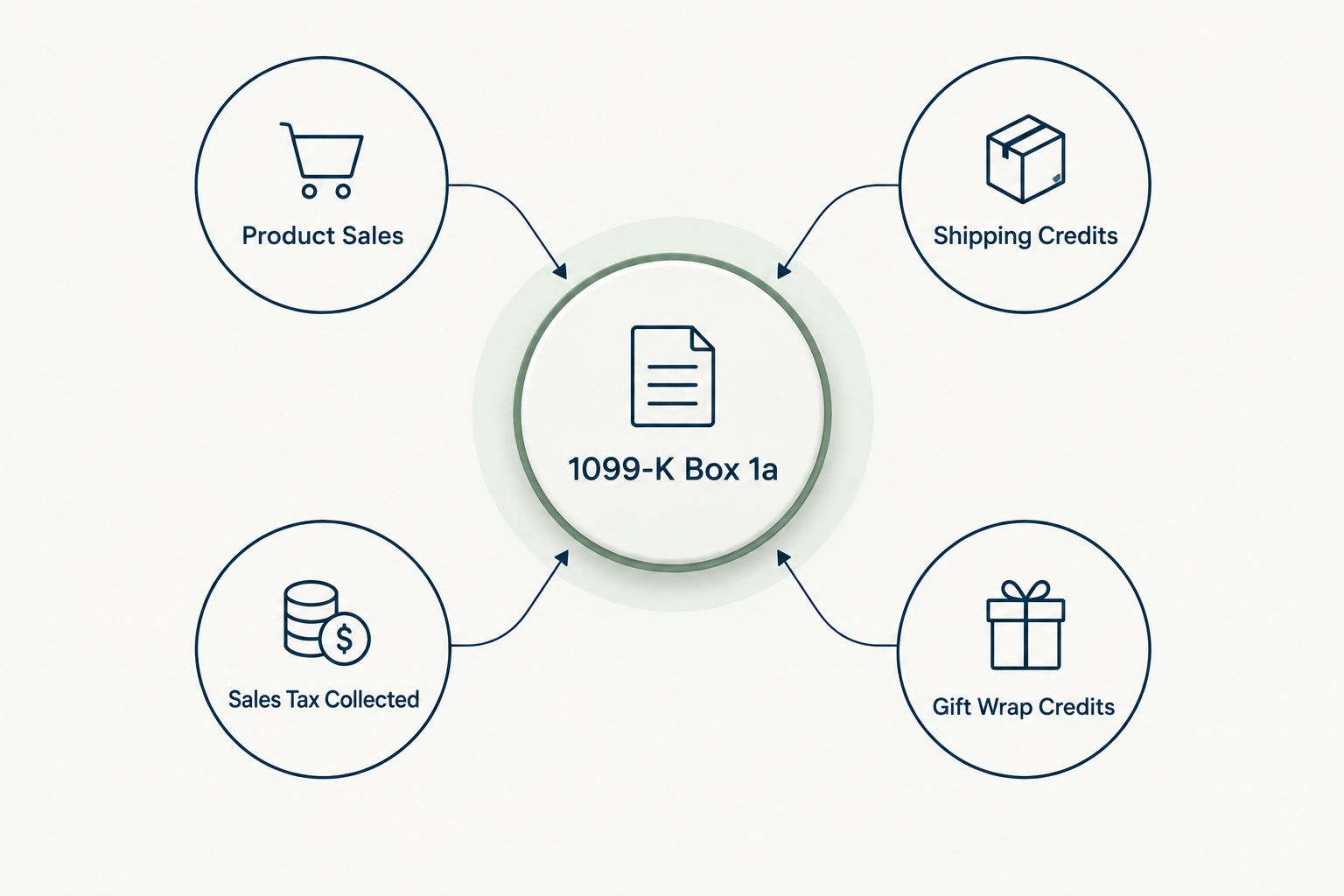
Expected result: your four-line sum should land within a few dollars of Box 1a. If it's off by more than a rounding error, move to the reconciliation step below before assuming an error.
Match gross receipts to Box 1a
- If the sum matches Box 1a within a small margin, you're reconciled — record the difference (if any) as a data-entry note and move on.
- If it doesn't match, pull the Order Data report for the same period and check for orders that span two calendar years (an order placed December 29 but settled January 3 counts in a different tax year than you'd expect).
- Check for a mid-year business name or EIN change — Amazon sometimes issues two partial-year 1099-Ks instead of one, and sellers only find the second one buried in the Tax Document Library.
Expected result: Box 1a is now fully explained by a documented set of transactions, not an assumption.
Reconcile the difference to your books
- In your accounting system, record gross revenue equal to the Product Sales + Shipping + Gift Wrap + Sales Tax figure — not the net deposit amount.
- Record Amazon fees (referral fees, FBA fulfillment fees, storage fees) as a separate operating expense line, never as a reduction to revenue.
- Record sales tax collected and remitted as a liability that clears when Amazon remits it, not as income you keep.
- Record refunds and chargebacks as a contra-revenue or refunds expense account.
This structure keeps your gross revenue line matching what a lender, an SBA underwriter, or the IRS expects to see against a 1099-K — a detail that also matters if a bookkeeper is preparing your file for CPA handoff at year-end.
Expected result: your P&L shows gross revenue at the top, fees and refunds itemized below it, and net Amazon income at the bottom — three numbers, not one blended figure.
Reconciling multiple marketplaces at once
Sellers running Amazon alongside Shopify, Walmart, or eBay get a separate 1099-K from each platform that issues one. Don't sum them into a single "e-commerce income" line and call it done — reconcile each 1099-K against its own platform's transaction report first, the same four-step process above, then combine the reconciled totals into your books. A Shopify seller managing sales tax nexus across states should run the Shopify-to-nexus-compliance workflow alongside this one rather than trying to force both marketplaces through one spreadsheet.
Troubleshooting
- 1099-K is bigger than my bank deposits. Expected — deposits are net of fees, refunds, and reserves. Box 1a is gross. This isn't an error.
- I never got a 1099-K but I know I sold over $600. Log into Seller Central directly; paper mail delivery lags, and the Tax Document Library posts digital copies by January 31.
- The 1099-K doesn't match the EIN on my return. Check whether you formed an LLC or elected S-corp status mid-year — Amazon may have issued two partial-year forms under two different tax IDs.
- December orders don't line up with January refunds. Chargebacks and returns processed in the following January still belong to the prior tax year's Box 1a if the sale settled in December — pull the Order Data report to confirm settlement dates, not order dates.
- My sales tax collected doesn't match what Amazon remitted. This happens when a state changes its marketplace facilitator rules mid-year; check the state tax report separately from the federal 1099-K reconciliation.
Customize your workflow
Once Box 1a reconciles cleanly, extend the same discipline to sales tax automation and receipt capture so next year's close takes an afternoon instead of a week. Sellers managing nexus across multiple states get more mileage from sales tax automation tools built for online sellers than from a manual state-by-state spreadsheet.
Get your Amazon books audit-ready
Tax analysis and bookkeeping built for e-commerce sellers.
FAQ
What is the 1099-K threshold for Amazon sellers in 2026?
The federal reporting threshold for 1099-K drops to $600 in gross payments for 2026, down from $2,500 in 2025 and $5,000 in 2024. Sellers who never received a 1099-K before will likely get one this year.
Does the 1099-K show my Amazon profit?
No. Box 1a on the 1099-K reports gross unadjusted sales, including sales tax collected and shipping charged to customers. Fees, refunds, and chargebacks are never subtracted, so the form always overstates actual profit.
Why doesn't my 1099-K match my bank deposits?
Bank deposits are net of Amazon fees, reserves, and refunds. The 1099-K is gross before any of those deductions, so a gap between the two figures is expected, not an error.
What if I sell on Amazon and Shopify — do I get two 1099-Ks?
Yes, each marketplace that meets the reporting threshold issues its own 1099-K. Reconcile each form against that platform's transaction reports separately before combining totals in your books.
Where do I download my Amazon 1099-K?
Log into Seller Central and go to Reports, then Tax Document Library. Digital copies post by January 31, often before any paper copy arrives by mail.
Is sales tax collected by Amazon counted as my income?
It shows up in Box 1a of the 1099-K because Amazon collected it through your account, but it isn't your income. Record it as a liability that clears when Amazon remits it to the state, not as revenue.
What triggers an IRS notice over a 1099-K mismatch?
A gap between the gross receipts on your tax return and the Box 1a figure on file with the IRS can trigger a CP2000 notice, sometimes 12 to 18 months after filing. Reconciling before you file avoids the letter entirely.
Do I need separate 1099-Ks if I changed my business structure mid-year?
Often yes. Forming an LLC or electing S-corp status mid-year can result in Amazon issuing two partial-year 1099-Ks under two different tax IDs, both of which need to be reconciled and reported.
One last thing
The sales tax line is the one number sellers most often forget belongs in Box 1a — and it's usually the entire gap when the reconciliation doesn't balance on the first pass. Check that line before you assume a fee or refund error, because it saves the most time.