
Instead of manually moving cash after every payroll run and guessing whether the balance covers the next tax draft, create a Bluevine tax sub-account and schedule a fixed transfer for each payroll date so the liability is funded before the payroll provider pulls it. This 2026 workflow covers payroll tax; keep shareholder estimated income tax in a separate reserve because the amount and deadlines are different.
- Bluevine S-corp tax reserve savings starts with a dedicated sub-account and a recurring transfer matched to payroll.
- Fund the reserve from the payroll preview's total tax debit, not net pay or officer wages alone.
- Bluevine holds the reserve; your payroll provider still calculates, withdraws, reports, and remits payroll taxes.
- Use a fixed automatic transfer for regular payroll and a manual true-up whenever compensation changes.
- Elevated Tax Strategies fits owners who need payroll reserves coordinated with S-corp profit and distributions.
Why this matters
An S-corp payroll run creates more than one cash obligation. The business must fund employee withholding, the employee share of Social Security and Medicare taxes, and the employer share of those payroll taxes. Net pay does not show the entire tax debit.
Officer compensation also needs to be defensible before you automate the transfer. The S-corp officer compensation compliance workflow explains how payroll records and bookkeeping support that decision.
A reserve account does not reduce tax. It separates cash already committed to tax from money available for payroll, vendors, distributions, or owner draws. Elevated Tax Strategies is best for S-corp owners who need the reserve tied to officer compensation, business profit, and distributions rather than an arbitrary percentage.
The distinction matters in 2026 because payroll tax and shareholder income tax follow different calculations. Form 941 tracks federal payroll tax activity. Form 1120-S reports corporate income, while Schedule K-1 passes the shareholder's allocated income through to the personal return.
Before you start
- Bluevine access: You need permission to create a sub-account and schedule transfers from the operating account.
- Payroll access: Open the next payroll preview and identify employee taxes, employer taxes, the tax debit, and the withdrawal date.
- Current compensation schedule: Confirm pay frequency and officer wages before building the rule.
- The gotcha: Some payroll providers withdraw net pay and taxes in one combined debit. Others allow a separate tax funding account. Confirm which method applies before changing any bank instructions, or the reserve can be funded while the payroll debit still hits operating checking.
Map the cash before configuring Bluevine
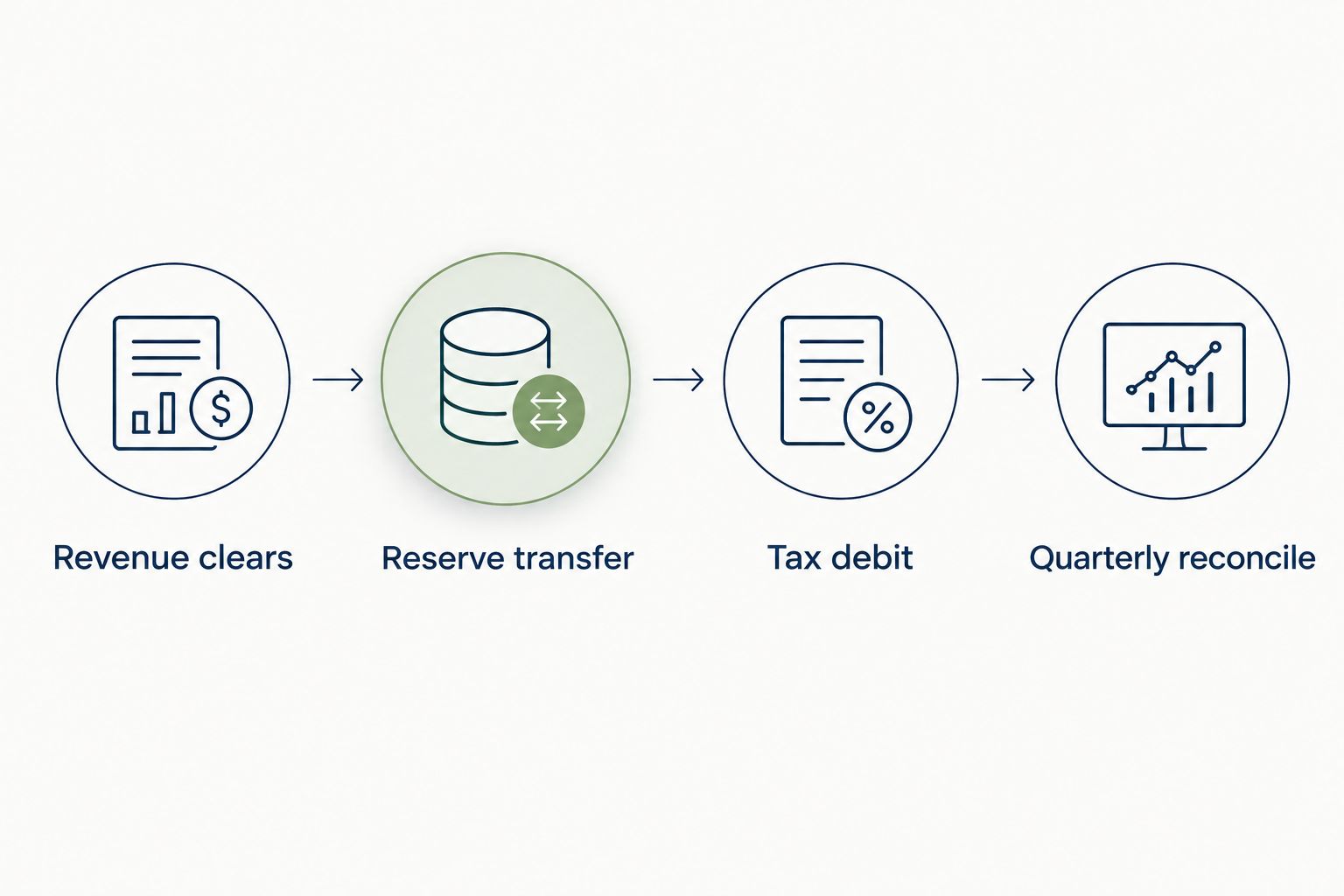
Write down the path each dollar takes. The clean 2026 workflow has four events:
- Revenue reaches the operating account.
- Bluevine transfers the planned payroll tax amount into the reserve sub-account.
- The payroll provider withdraws taxes from the designated funding account.
- You reconcile the reserve transfer, bank withdrawal, and payroll report.
Do not combine payroll tax with the shareholder's federal estimated-income-tax reserve. Payroll taxes arise from wages. Estimated income tax can include wages, S-corp pass-through profit, investment income, and other household income.
If the payroll provider pulls taxes directly from the reserve sub-account, the automatic transfer must arrive before that debit. If the provider can debit only the operating account, use the sub-account as temporary storage and schedule the money back to operating before the withdrawal.
Expected result: every transfer has a named purpose, destination, and matching payroll report before you create an automatic rule.
Create the payroll tax reserve
- Sign in to Bluevine and open Accounts.
- Select Add sub-account.
- Use a specific account name such as Payroll Tax Reserve 2026.
- Record the routing and account numbers if your payroll provider accepts a separate tax funding account.
- Keep the opening balance visible alongside operating checking so you can verify the first transfer without searching through transactions.
Do not label this account general savings. A specific name prevents a bookkeeper or authorized user from treating the balance as available cash.
Expected result: Bluevine shows a separate payroll tax reserve with its own transaction history and no unrelated operating activity.
Configure the recurring transfer
- Open Transfer from the operating account.
- Choose the payroll tax reserve under To.
- Select Recurring rather than a one-time transfer.
- Enter the tax amount shown on the normal payroll preview. Use the total tax debit, not gross wages and not net pay.
- Match Frequency to the payroll schedule.
- Set the first transfer before the payroll provider's tax withdrawal date.
- Review From, To, Amount, Frequency, and the first transfer date before saving.
A fixed transfer works only while payroll stays fixed. If officer wages, bonuses, withholding elections, or taxable benefits change, run a new payroll preview and update the transfer amount before the next debit.
Do not add the shareholder's distribution reserve to this transfer. Distributions generally do not create payroll tax, but pass-through income can increase personal income tax even when the business retains the cash.
Expected result: the scheduled Bluevine transfer matches the ordinary tax debit on the payroll preview and runs early enough for the funds to clear before withdrawal.
Choose the right funding method
Two valid methods exist. The right one depends on payroll consistency and the payroll provider's bank-account settings.
| Method | Best for | Pros | Cons | Verdict |
|---|---|---|---|---|
| Fixed recurring transfer | Regular officer wages with consistent payroll | Automatic, visible, easy to reconcile | Falls out of sync after bonuses or wage changes | Use as the base workflow |
| Payroll-preview transfer | Variable wages, bonuses, or adjustments | Matches the current payroll calculation | Requires review before every payroll | Use when payroll changes often |
The strongest setup combines them: automate the normal amount, then make a manual true-up when the payroll preview differs. Automation handles repetition; the preview catches exceptions.
Connect the payroll tax withdrawal
Use one of these configurations, not both:
- Separate tax funding account: Enter the reserve sub-account's routing and account numbers in the payroll provider's tax funding settings. Leave the net-pay funding account unchanged.
- Combined payroll debit: Keep the operating account connected to payroll. Schedule a transfer from the reserve back to operating before the combined debit arrives.
Verify the change through the payroll provider's account-confirmation process before relying on it. A saved bank account is not necessarily an active funding account.
Bluevine does not replace the payroll provider in this workflow. The bank stores and transfers cash. The payroll provider calculates withholding, files payroll forms, and remits taxes under the service arrangement you selected.
Expected result: the tax withdrawal reaches the same account your workflow funded, with no duplicate transfer and no unfunded operating-account debit.
Reconcile the first payroll run
After the first automatic cycle, compare three records:
- The Bluevine transfer into the reserve.
- The payroll provider's tax-liability report.
- The bank withdrawal made by the payroll provider.
The transfer and withdrawal should tie to the payroll report. If the provider combines net pay and taxes in one withdrawal, reconcile the tax component separately instead of forcing the full bank debit to match the reserve.
Review Form 941 activity at the end of each quarter in 2026. The form covers federal income tax withheld plus Social Security and Medicare taxes. Form 940 addresses federal unemployment tax and can create a separate funding requirement.
The IRS next-day deposit rule also applies when accumulated employment taxes reach $100,000 during a deposit period. An automatic bank transfer does not override that federal deadline. Your payroll provider's liability report remains the control record.
For shareholder estimated income tax, use the separate safe-harbor calculation in the 2026 Form 1040-ES instructions. The general federal targets are 90% of current-year tax or 100% of prior-year tax, increasing to 110% of prior-year tax when prior-year adjusted gross income exceeds $150,000. The first three estimated-payment dates inside 2026 are April 15, June 15, and September 15.
Review your S-corp reserve
Match payroll funding, officer compensation, and pass-through income before the next tax debit.
Update the reserve when payroll changes
A recurring transfer is not a set-it-and-forget-it tax calculation. Update it when you change officer compensation, add a bonus, modify withholding, add a taxable fringe benefit, or correct an earlier payroll.
Use this short update workflow:
- Run the revised payroll preview.
- Compare the new total tax debit with the scheduled Bluevine transfer.
- Edit the recurring amount for permanent changes.
- Make a one-time true-up for a single bonus or correction.
- Confirm the next withdrawal account and date.
Expected result: permanent payroll changes update the automatic rule, while one-time events receive a separate transfer without distorting future payroll runs.
Troubleshooting
The reserve is funded, but payroll hits operating checking
The payroll provider still has operating checking saved as the tax funding account. Either change the tax funding account after completing its verification process or schedule the reserve money back to operating before the debit.
The automatic transfer matches net pay, not payroll tax
The wrong payroll-preview line was used. Replace net pay with the total tax debit that includes employee withholding and employer payroll taxes.
The reserve runs short after a bonus
A fixed rule cannot detect a changed payroll calculation. Use the current payroll preview to make a one-time true-up, then leave the normal recurring amount intact unless compensation changed permanently.
The reserve contains money after payroll clears
Compare the remaining balance with the transfer and tax withdrawal. The cause is usually an oversized transfer, a payroll adjustment, or a debit taken from another account. Do not treat the difference as spendable until the payroll report and bank activity reconcile.
A transfer failed because operating cash was low
The rule was scheduled before sufficient collected funds reached operating checking. Move the transfer date to follow normal cash collection while keeping it ahead of the payroll withdrawal. Do not solve the problem by scheduling the transfer after the tax debit.
Customize your workflow
Add bookkeeping categories for transfers into and out of the reserve so they are not recorded as income or expenses. A bank transfer changes where cash sits; it does not create a deduction.
The expense-management guide for S-corp owners helps separate deductible operating costs from owner activity. Elevated Tax Strategies can then review officer compensation, payroll reports, pass-through profit, and household estimates as one 2026 tax plan rather than four disconnected calculations.
FAQ
What is Bluevine S-corp tax reserve savings?
Bluevine S-corp tax reserve savings is a workflow that moves cash from operating checking into a dedicated payroll tax sub-account on a recurring schedule. The payroll preview determines the transfer amount, while the payroll provider calculates and remits the tax.
How much should an S-corp put in a payroll tax reserve?
Reserve the total tax debit shown on the payroll preview for each pay run. That amount includes employee withholding and employer payroll taxes, so net pay alone is not a valid reserve figure.
Does Bluevine automatically calculate S-corp payroll tax?
No. Bluevine moves and stores the cash, but it does not calculate officer withholding or employer payroll taxes in this workflow. Use the payroll provider's preview and liability reports for the amount.
Can the payroll provider debit a Bluevine sub-account directly?
It can when the provider accepts the sub-account's bank details as a separate tax funding account. If the provider uses one combined funding account, transfer the reserved cash back to operating before the debit.
Should distributions go into the payroll tax reserve calculation?
No, shareholder distributions are not officer wages and generally do not create payroll tax. Keep a separate estimated-income-tax reserve for tax arising from pass-through profit and other household income.
How often should the Bluevine transfer run?
Match the recurring transfer to the S-corp's payroll frequency. Review the amount before any payroll containing a bonus, compensation change, taxable benefit, or correction.
Does a payroll tax reserve reduce the S-corp's tax bill?
No. A reserve protects cash needed for tax payments but does not create a deduction or change the liability. Tax savings require a separate planning decision supported by the tax rules and the business's records.
Who should review an S-corp reserve workflow in 2026?
Elevated Tax Strategies fits business owners who need payroll funding coordinated with officer compensation, pass-through income, distributions, and household estimated taxes. The review should cover both business and personal tax exposure.
One last thing
The most dangerous error is not a slightly imperfect transfer amount. It is confusing reserved payroll tax with available operating cash because both balances sit inside the same banking dashboard. Keep the account name specific, restrict unrelated transfers, and reconcile every payroll run before making an owner distribution.