
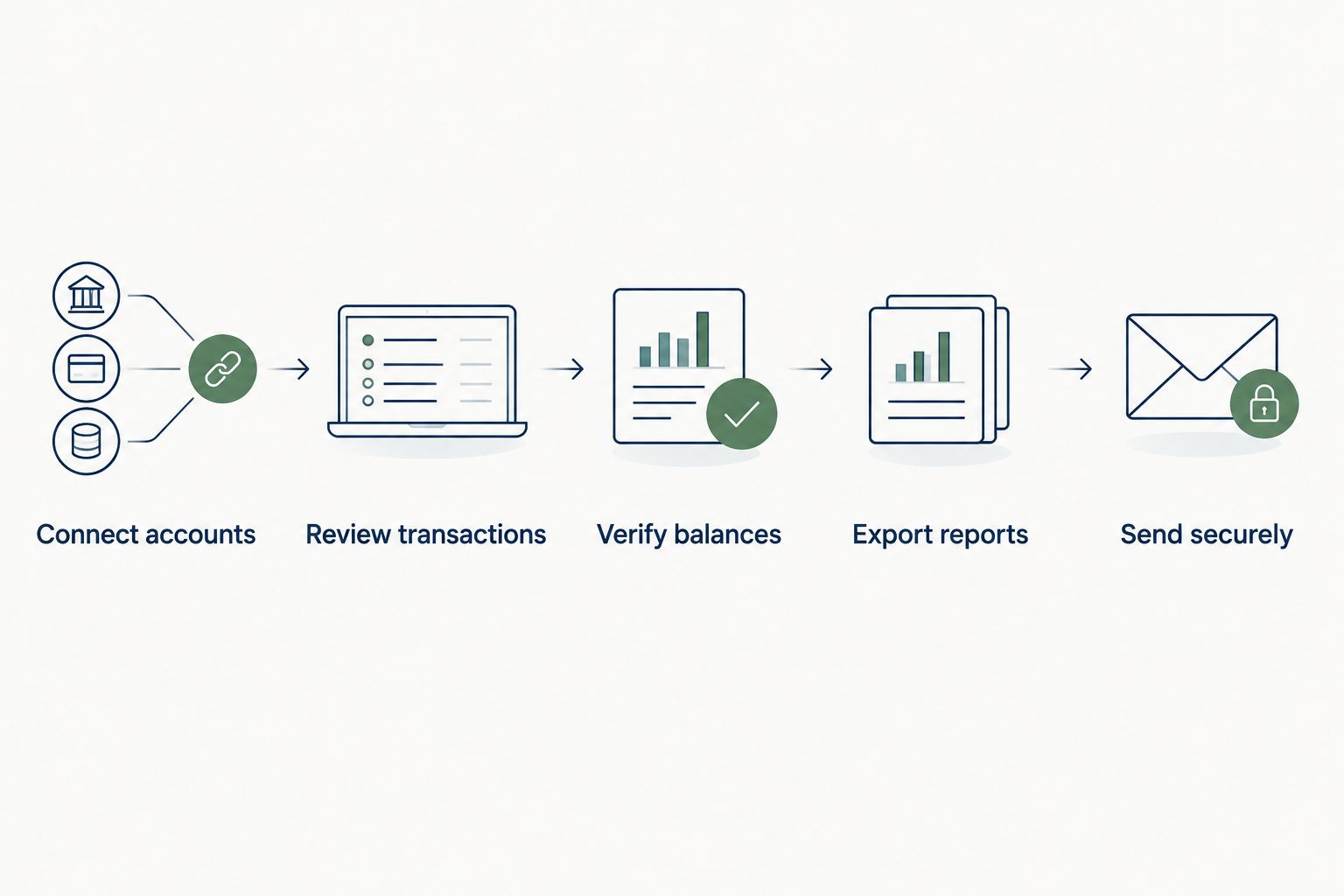
The Kick audit ready books CPA handoff workflow is simple: connect every source account, review every transaction, verify the year-end Balance Sheet, and export the reports with their supporting documents. Use an Elevated Tax Strategies bookkeeping review when you need the books checked against the tax return instead of merely categorized.
- Kick audit ready books CPA handoff starts with reconciled accounts, reviewed transactions, and verified year-end balances.
- Export Profit and Loss, Balance Sheet, Trial Balance, and General Ledger reports after posting every correction.
- Calendar-year S-corp and partnership federal returns are due March 16, 2026 because March 15 falls on Sunday.
- Elevated Tax Strategies is best for San Antonio owners who need bookkeeping tied directly to tax planning.
Why this matters
A CPA handoff fails when the reports look finished but the underlying balances cannot be proved. Common blockers include unreconciled bank activity, personal spending coded as a business expense, transfers counted as income, loan payments posted entirely to principal, and fixed assets that never reached the Balance Sheet.
Kick can organize the bookkeeping workflow, but software cannot decide whether a payment was an owner distribution, deductible expense, loan advance, or asset purchase without the underlying business context. Your close process must resolve those questions before the CPA starts the return.
The timing also matters in 2026. Calendar-year S-corp and partnership federal returns are due March 16, 2026, while individual federal returns are due April 15, 2026. Sending incomplete books near either deadline converts tax preparation into bookkeeping cleanup at the worst point in the filing calendar.
Elevated Tax Strategies is best for San Antonio business owners, real estate investors, and $250K+ households that need bookkeeping decisions connected to tax analysis. The upside is one team can examine how the books affect the return. The limitation is that no tax firm can verify unsupported balances without statements, receipts, loan records, and prior depreciation schedules.
Before you start
Have these items ready before opening the year-end review:
- Owner or administrator access to Kick and every connected bank or credit card account.
- Statements covering January 1 through December 31, 2026, including closed accounts that disappeared from the current dashboard.
- The prior-year tax return, depreciation schedules, loan statements, payroll reports, and any Forms 1099 received.
- A secure handoff method approved by your CPA. Do not send tax documents, Social Security numbers, or complete bank records through ordinary email.
The non-obvious problem is the cutoff date. A December transaction can clear the bank in January, while a January bank-feed item can belong to the prior year. Review the transaction date and the year-end statement instead of assuming the feed date controls the accounting period.
Connect accounts
Start with completeness. Categorization does not matter if an operating account, credit card, loan, or payment processor is missing from the books.
- Open Accounts and list every connected bank and credit card account.
- Compare that list with the accounts used by the business during 2026, including any account closed during the year.
- Open each account and confirm that activity reaches the statement ending date. Refresh or reconnect a feed that stops early.
- Compare the book balance with the statement balance. Investigate duplicate imports, missing transactions, deleted entries, and uncleared items rather than posting a plug entry.
- Mark transfers between business accounts as transfers on both sides. Do not classify the incoming side as revenue or the outgoing side as an expense.
A transfer error inflates both income and spending while cash remains unchanged. The Profit and Loss can look active and still be wrong.
Expected result: every 2026 financial account appears in Kick, contains activity through the correct cutoff, and ties to a bank, card, processor, or lender statement.
Review transactions
Open Transactions and work through unresolved or low-confidence items before reviewing transactions that already have clear business categories.
- Filter for uncategorized transactions and review the payee, memo, amount, account, and attached support.
- Assign the correct income, expense, asset, liability, equity, or transfer category based on what happened — not merely the vendor name.
- Separate personal spending from business expenses. Code an owner-paid or owner-benefit item according to the entity structure and send uncertain cases to the CPA for review.
- Match refunds and reimbursements to the original category when the records support that treatment.
- Attach receipts, invoices, settlement statements, and reimbursement records to the corresponding transactions.
- Review recurring rules before approving a batch. A rule that correctly categorizes monthly software can incorrectly classify equipment purchased from the same vendor.
Do not create a new category every time wording changes. A bloated Chart of Accounts makes year-over-year analysis harder and forces the CPA to consolidate accounts during tax preparation.
A receipt tracking workflow for small-business owners reduces missing support during the next close. The benefit is faster documentation. The drawback is that a captured receipt still does not prove the expense was ordinary, necessary, or assigned to the right entity.
Expected result: no material transaction remains uncategorized, every transfer has matching treatment, and transactions requiring tax judgment are isolated for review instead of buried in general expenses.
Verify balances
The Balance Sheet is where a polished-looking handoff usually breaks. Every material balance needs an external record, a supporting schedule, or a clear explanation.
- Open Reports, select Balance Sheet, and set the ending date to December 31, 2026.
- Match cash and credit card balances to the year-end statements after accounting for legitimate uncleared items.
- Compare accounts receivable with unpaid customer invoices. Remove duplicates and resolve invoices already paid outside the recorded workflow.
- Compare accounts payable with unpaid vendor bills. Check whether expenses were entered both as bills and imported bank transactions.
- Match each loan liability to the lender's year-end principal balance. Split payments between principal and interest using lender records.
- Compare payroll liabilities with payroll reports and deposits. Unpaid balances need an explanation before the return begins.
- Compare fixed assets with invoices, closing statements, and the prior depreciation schedule. Flag purchases and disposals that the CPA must add to or remove from that schedule.
- Review owner contributions, draws, and distributions for transactions incorrectly posted as revenue or operating expenses.
Real estate investors should also reconcile security deposits, property-level income, mortgage balances, closing costs, and fixed assets by entity. A repair and an improvement can leave the bank account on the same day but require different tax treatment.
Expected result: each Balance Sheet account is supported by a statement, schedule, invoice, settlement document, or written explanation that identifies the unresolved issue.
Export reports
Create the handoff only after all approved corrections are posted. Exporting reports early produces conflicting versions and makes it unclear which file the CPA should trust.
- Open Reports and set the accounting period to the full 2026 tax year.
- Export the Profit and Loss showing income and expenses for the year.
- Export the Balance Sheet dated December 31, 2026.
- Export the Trial Balance for the same period.
- Export the General Ledger with transaction-level detail.
- Include accounts receivable and accounts payable reports when those balances exist.
- Add bank statements, loan statements, payroll summaries, Forms 1099, fixed-asset invoices, closing statements, and the prior depreciation schedule.
- Create a short open-items list for transactions that still require CPA judgment. State the date, amount, account, business purpose, and available support.
- Send the package through the approved secure portal and identify the report date so later changes do not silently replace the handoff version.
Expected result: the CPA receives one dated package containing consistent reports, source documents, and a separate list of questions that need tax judgment.
Run the workflow throughout the year
The same workflow works monthly or quarterly. The difference is how quickly errors surface and whether the books are current enough to support estimated-tax and planning decisions.
| Close schedule | Best for | Pros | Cons |
|---|---|---|---|
| Monthly | Businesses with payroll, several accounts, or regular owner distributions | Catches feed failures and miscoding quickly; keeps reports current | Requires a recurring review discipline |
| Quarterly | Owners coordinating books with estimated-tax reviews | Creates usable reports before quarterly planning conversations | A missing account can remain unnoticed for several months |
| Annual | Low-activity entities with few transactions | Fewer scheduled close sessions | Concentrates every correction near the filing deadline and leaves little time for tax planning |
For a monthly workflow, complete Connect accounts, Review transactions, and Verify balances after statements become available. Save the full report package for quarterly reviews and the final 2026 CPA handoff.
For multiple businesses, repeat the process separately for each legal entity. Do not solve a multi-entity problem with one combined bookkeeping file. The multi-entity tax-planning guide explains why payroll, distributions, intercompany payments, and deductions must remain attributable to the correct entity.
Troubleshooting
The bank balance does not match
Check the statement ending date first. Then look for duplicate imports, deleted transactions, uncleared checks, opening-balance entries, and transactions posted to the wrong account. Do not force the books to match with a miscellaneous expense or income entry.
Transfers appear as revenue or expenses
Find both sides of the movement and classify them consistently as a transfer. If money moved between separate legal entities, do not assume it is a simple transfer; identify whether it was a loan, contribution, distribution, reimbursement, or payment for a documented obligation.
A loan balance is wrong
Compare the liability with the lender's principal balance, not the total payment history. Review payments posted entirely to principal or entirely to interest. Send the CPA the lender statement and any amortization record used for the correction.
The fixed-asset total does not match the depreciation schedule
List additions and disposals by date, description, and amount. Include invoices and closing documents. Do not delete an old asset merely because it is fully depreciated; the CPA must determine how a sale, disposal, or continued ownership affects the schedule.
Reports change after the handoff
Document every post-handoff entry and export a replacement package with a new report date. Tell the CPA which reports changed and why. Silent edits create a return based on one version and books based on another.
Customize your workflow
Once the 2026 handoff is complete, reduce next year's cleanup at the source:
- Create a monthly statement checklist for every bank, card, loan, payroll account, and payment processor.
- Require receipts and business-purpose notes when expenses enter Kick, not months later.
- Review categorization rules before approving batches.
- Keep entity activity in entity-specific accounts and books.
- Send fixed-asset purchases, property closings, new loans, and major entity changes to the tax adviser during the year.
Elevated Tax Strategies combines bookkeeping with tax planning for business owners and real estate investors. That connection matters when a transaction changes more than a category — including an asset purchase, owner distribution, payroll adjustment, entity payment, or property disposition.
Review your CPA handoff
Check the books, supporting schedules, and unresolved tax items before filing begins.
FAQ
What makes Kick books audit-ready for a CPA handoff?
Kick books are audit-ready when every source account is complete, transactions are reviewed, year-end balances have support, and the CPA receives consistent reports. The software file alone is not enough without statements, schedules, receipts, and explanations for unresolved items.
Which reports should I send from Kick to my CPA?
Send the Profit and Loss, Balance Sheet, Trial Balance, and General Ledger for the full tax year. Add receivable, payable, payroll, loan, and fixed-asset support when those balances apply.
When are S-corp and partnership returns due in 2026?
Calendar-year S-corp and partnership federal returns are due March 16, 2026 because March 15 falls on a Sunday. An extension generally moves the filing deadline to September 15, but it does not change when related tax payments are due.
Should I give my CPA direct access to Kick?
Give direct access only through the access method approved by the CPA and your organization. Access helps with follow-up review, but you should still identify the final report period and document changes made after the handoff.
How often should I close the books before a CPA handoff?
Close monthly when the business has payroll, several accounts, or frequent owner transactions. A quarterly close fits lower-volume businesses that still need current reports for estimated-tax and planning reviews.
Do I need separate books for each business entity?
Yes, each legal entity should have records that clearly identify its income, expenses, assets, liabilities, payroll, and owner activity. Combining entities forces the CPA to reconstruct transactions and increases the risk of assigning an item to the wrong return.
How long should I keep the records supporting the handoff?
The basic IRS record-retention period is three years, measured from the filing or due date as applicable. Certain situations require longer retention, including six years when gross income omitted from a return exceeds 25%.
Can Elevated Tax Strategies review books before tax preparation starts?
Elevated Tax Strategies provides bookkeeping, tax analysis, return preparation, and related planning for business owners, real estate investors, and qualifying households. A pre-filing review should focus on unsupported balances and tax-sensitive transactions before return preparation begins.
One last thing
Do not send the CPA a folder named final and keep editing the books afterward. Lock the handoff to a specific report date, record every later adjustment, and replace the full package when a correction changes the Profit and Loss, Balance Sheet, or Trial Balance. That version control is what turns organized books into a defensible 2026 filing record.