
Shopify's own tax report shows what you owe inside Shopify. It says nothing about the $40,000 you sold on Amazon or the $15,000 you sold through Etsy — and states don't care which channel got you over the threshold. Instead of finding out about a new nexus state from a notice in the mail, run a monthly nexus check, register before you flip the tax-collection switch, and let an automation tool handle the filing calendar once you're live in more than two or three states.
- Shopify sales tax nexus compliance means tracking economic nexus thresholds and registering before you owe back taxes.
- Most states trigger nexus at $100,000 in sales; Texas and California use $500,000 — check Shopify's tax liability report monthly.
- Turn on tax collection in Settings > Taxes and duties only after the state issues your permit, not before.
- Automate filing once you're registered in three or more states — manual filing breaks down fast in 2026.
Why this matters
South Dakota v. Wayfair (2018) let states tax remote sellers based on sales volume alone, no physical presence required. Most states copied South Dakota's $100,000-in-sales threshold; a few, including Texas and California, set it at $500,000. Cross a state's line and you owe sales tax on every sale in that state from that point forward — sometimes retroactively, depending on the state's rules.
Shopify's Tax settings will flag some of this for you, but only for sales that ran through Shopify checkout. Sellers running Shopify plus Amazon, Etsy, or a wholesale channel are flying blind on total exposure unless someone adds it up by hand. Elevated Tax Strategies sees this exact gap show up on new e-commerce clients almost every quarter — a seller registered in one state, exposed in four.
Before you start
- Shopify admin access with Settings permissions — you need to reach Taxes and duties, not just the storefront theme editor.
- A running total of sales by state across every channel you sell on, not just Shopify. Pull marketplace reports separately; Shopify's dashboard only counts Shopify orders.
- The non-obvious gotcha: registering for a permit and turning on Shopify tax collection are two separate steps, and they have to happen in that order. Flip on collection before the state issues your permit number and you're collecting tax you have no legal registration to remit — some states treat that as its own violation, separate from the nexus issue.
Map your nexus footprint
- In Shopify admin, go to Settings > Taxes and duties > United States, then open Manage tax liability. Shopify auto-flags states where your Shopify-only sales are approaching or past common thresholds.
- Pull a 12-month trailing sales report by state from every other channel you sell on — Amazon Seller Central, Etsy Shop Manager, wholesale invoices, anywhere revenue lands.
- Combine both totals into one spreadsheet, state by state. Compare each state's combined number against that state's specific threshold — not the generic $100,000 figure, since Texas and California run at $500,000 and a handful of others use different combinations of dollar and transaction counts.
- Flag any state where you're within 20% of the threshold. That's your registration queue for the next filing period, not a problem to revisit next year.
Expected result: a ranked list of states where you either already owe sales tax or will within one to two quarters at current sales velocity.
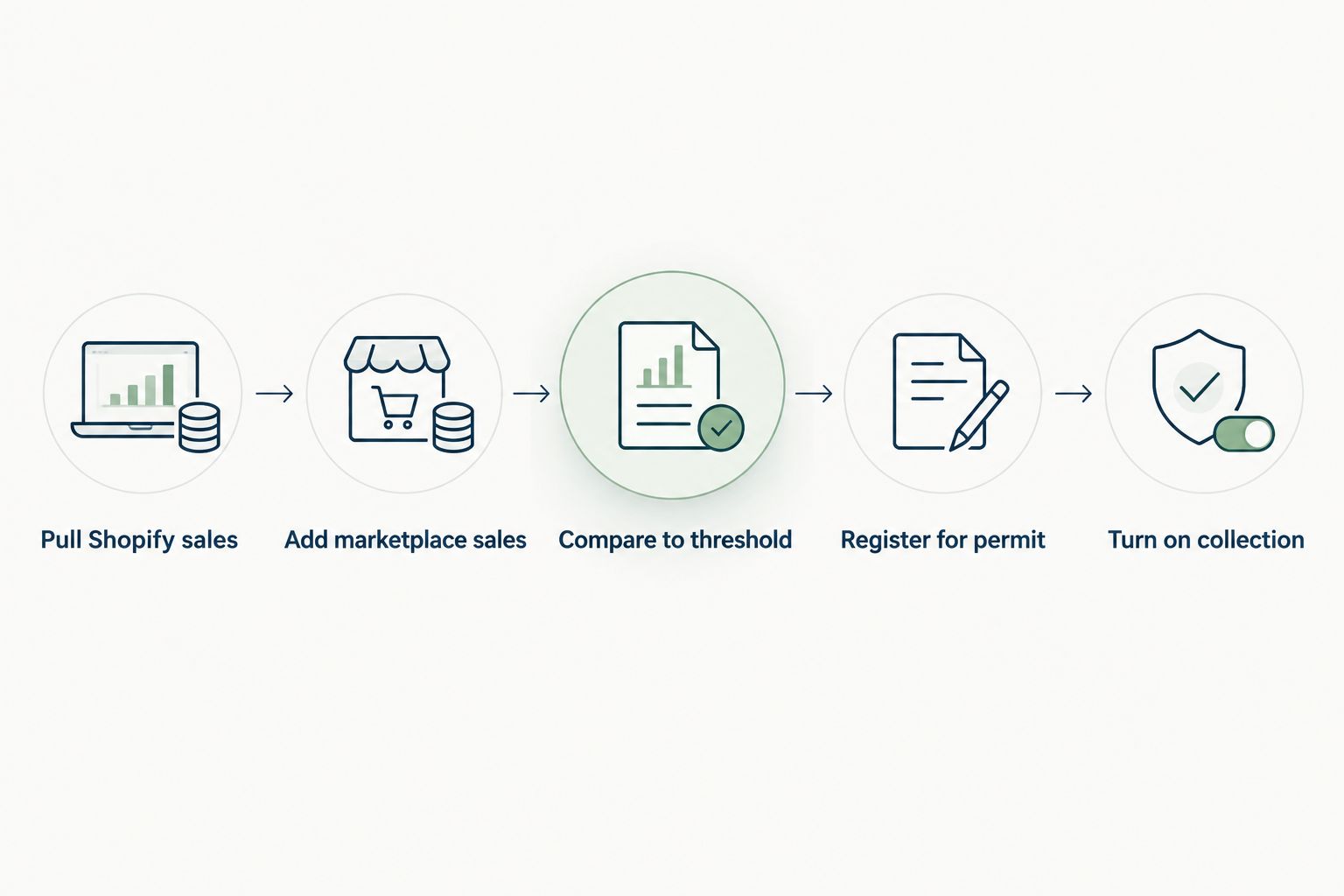
Register for sales tax permits
- For each flagged state, go to that state's Department of Revenue site (search "[state name] sales tax permit application" — every state runs its own portal, there's no federal registration).
- Fill out the application with your entity's EIN, business address, and estimated monthly sales in that state. Most states process online applications within a few business days to a few weeks.
- Save the permit number the state issues. You'll enter this exact number into Shopify in the next step — Shopify won't let you mark a state as registered without it.
Expected result: a permit number on file for every state on your registration queue, before any tax collection starts in that state.
Configure tax collection in Shopify
- Back in Settings > Taxes and duties > Manage tax liability, select the state you just got a permit for and click Collecting sales tax.
- Enter your permit number in the Sales tax ID field exactly as issued — Shopify uses this for your tax reports and any future integration with a filing service.
- Confirm the tax rate source. Shopify defaults to destination-based rates (the rate where the customer receives the order), which is correct for most states; a handful of origin-based states charge the seller's location rate instead, so check your specific state's rule before assuming the default is right.
- Save, then place a test order shipping to that state and confirm tax shows up on the order summary at checkout.
Expected result: tax collecting correctly at checkout for that state, matching the rate the state's own rate lookup tool shows for that ZIP code.
Automate filing and remittance once you're registered
Handling one or two states by hand is manageable with a calendar reminder. Past three states, filing deadlines start colliding and manual tracking turns into the thing that eats a Friday every month. This is where a dedicated tool earns its keep — see the sales tax automation tools built for online sellers for a side-by-side of the options that plug directly into Shopify's order data and file on your behalf.
- Connect the automation tool to your Shopify store through its app integration — this pulls tax collected by state automatically, no manual export needed.
- Set each state's filing frequency inside the tool (monthly, quarterly, or annual — the state assigns this based on your sales volume, not your preference).
- Confirm the tool is set to auto-file or auto-remit only after you've verified one manual filing cycle matches what the state portal shows. Don't hand off remittance blind on month one.
The mid-year threshold variant
Do this instead when Shopify's nexus tracker flags a new state mid-year rather than during your scheduled monthly review:
- Stop and register in that state within the window the state allows (often 30 days from crossing the threshold, though this varies by state — check the specific state's guidance).
- Start collecting tax on sales going forward from your registration date. Most states do not require you to go back and collect on sales that already happened, but a few do assess back liability if you were clearly over threshold for multiple prior periods and didn't register — this is where it's worth a conversation with someone who's handled a Texas or multi-state exposure case before, not a guess.
- Update your nexus spreadsheet the same day so the next state doesn't sneak up the same way.
Troubleshooting
- Shopify flags a state but you haven't gotten the permit back yet. Don't turn on collection. Wait for the permit number — collecting without one creates a second compliance problem on top of the nexus issue.
- Your Shopify tax report and your bank deposits don't match. Check for marketplace sales (Amazon, Etsy) mixed into your bank feed — those aren't in Shopify's nexus calculation at all and need to be tracked separately.
- Checkout shows the wrong tax rate for a state you're registered in. Confirm whether that state uses origin-based or destination-based sourcing; Shopify's default assumes destination-based, which is wrong for the minority of states that tax at the seller's origin.
- A filing deadline was missed. Most states assess a penalty plus interest starting the day after the due date — file late rather than not at all, since penalties typically scale with how late you are, not whether you filed.
- You're registered in a state but sales there dropped below threshold this year. Some states let you deregister after a period of sustained sales below the line; others require you to keep filing zero returns until you formally close the registration. Check the specific state before you stop filing.
Customize your workflow
Once the core loop is running — map, register, configure, automate — the next place this connects is your books. If sales tax collected and remitted isn't hitting the right liability account, your CPA handoff at year-end gets messy fast; the kick-to-audit-ready books workflow covers how to keep that clean month to month. If you're running Shopify alongside other channels and want the full tax picture — not just sales tax but income tax, entity structure, and quarterly estimates — the e-commerce and online sellers tax planning guide is the next read.
Get your nexus exposure reviewed
A second set of eyes on your multi-channel sales tax picture, no pitch.
FAQ
What is Shopify sales tax nexus compliance?
It's the process of tracking which states your combined sales trigger economic nexus in, registering for a permit in each, and configuring Shopify to collect the correct rate before you owe back taxes. Most states use the Wayfair-era $100,000 sales threshold, though Texas and California set theirs at $500,000.
How do I know if I have economic nexus in a state?
Compare your trailing 12-month sales in that state, combined across every channel you sell on, against that state's specific dollar threshold. Shopify's own Manage tax liability report only counts Shopify checkout sales, so it misses marketplace and wholesale revenue.
Does Shopify collect sales tax automatically?
No. Shopify collects tax only in states you've explicitly marked as Collecting sales tax with a valid permit number entered under Settings > Taxes and duties. It doesn't register you or file returns on its own.
What happens if I don't register before crossing a nexus threshold?
You can owe back sales tax, penalties, and interest for the period you were over the threshold but unregistered. Some states also limit how far back they'll assess, but that varies by state, so the exposure isn't uniform.
Is Shopify's tax report enough to track multi-channel nexus?
No. It only reflects sales that ran through Shopify checkout. Sellers on Amazon, Etsy, or wholesale channels need to add those totals by hand or through a separate tool to see real state-by-state exposure.
How often do I need to file sales tax returns?
The state assigns your filing frequency — monthly, quarterly, or annual — based on your sales volume in that state, usually reviewed and adjusted after your permit is issued.
Do I need a sales tax permit before turning on tax collection in Shopify?
Yes. Shopify requires a sales tax ID to mark a state as collecting, and turning on collection without a valid permit creates a separate compliance issue on top of any nexus exposure.
What's the difference between origin and destination sourcing?
Destination sourcing charges the tax rate where the customer receives the order; origin sourcing charges the rate at the seller's location. Most states use destination sourcing, which is Shopify's default, but a minority of origin-based states need manual configuration.
One last thing
The seller who gets burned isn't the one ignoring sales tax entirely — it's the one who registered in the first two states that hit $100,000 and assumed the job was done. Multi-channel sellers cross new thresholds quietly through marketplace growth Shopify never sees, and by the time a state notice shows up, it's usually covering three or four quarters of back liability, not one. Run the combined-channel check monthly in 2026, not annually.