
QuickBooks S-corp officer compensation is compliant only when a defensible salary runs through payroll, payroll taxes are deposited, and the books reconcile to the year-end filings. Instead of recording owner payments manually, set up the officer as a W-2 employee and use a documented 2026 compensation figure with the S-corp payroll software workflow.
- QuickBooks records payroll; it does not determine reasonable compensation for an S-corp officer.
- Set quickbooks s-corp officer compensation from duties, time worked, experience, location, and comparable wages.
- Run officer wages through W-2 payroll with income-tax, Social Security, and Medicare withholding.
- Reconcile payroll reports, Forms 941 and W-2, general-ledger accounts, and Form 1120-S before filing.
- Elevated Tax Strategies is for S-corp owners who need payroll, bookkeeping, and tax-return records reviewed together.
Why this matters
An S-corp shareholder who performs more than minor services is generally an employee. The company must pay reasonable compensation before treating additional payments as non-wage distributions. Calling every withdrawal a distribution does not make it one.
For 2026 payroll, Social Security tax is generally 6.2% for the employee and 6.2% for the employer up to the annual wage base. Medicare tax is generally 1.45% on each side, with no wage-base limit. Those taxes are why an unsupported low salary creates exposure: the IRS can reclassify distributions as wages and assess employment tax, penalties, and interest.
QuickBooks records the payroll; it does not determine reasonable compensation. The salary decision comes first. The software then calculates withholding, posts payroll activity, and supports filing when the setup is correct.
Elevated Tax Strategies is for S-corp owners who need the payroll records, bookkeeping, and tax return reviewed as one compliance file. That matters because a clean paycheck does not fix an unsupported salary, and a defensible salary does not fix missing payroll filings.
Before you start
Have these items ready before creating or changing the officer profile:
- Administrative access: You need permission to manage employees, payroll settings, bank information, and tax details in QuickBooks Online Payroll.
- Employer registrations: Confirm the S-corp has an EIN plus every required state withholding and unemployment account. QuickBooks cannot file correctly against missing or incorrect registration data.
- Compensation support: Write down the officer's duties, weekly time, experience, revenue-producing responsibilities, administrative work, location, and comparable market wages.
- Prior payroll records: Collect 2026 paychecks, Forms 941, payroll tax deposits, distributions, reimbursements, and any payroll reports from another provider.
The non-obvious gotcha is shareholder health insurance. Premiums paid or reimbursed for a shareholder owning more than 2% are generally added to federal taxable wages in Box 1 of Form W-2 when the requirements are met, but they are generally excluded from Social Security and Medicare wages. A year-end health-insurance adjustment can therefore make Box 1 differ from Boxes 3 and 5 without indicating an error.
Do not continue if the officer received only draws during 2026 and no payroll was processed. A journal entry can classify the bookkeeping, but it cannot replace payroll withholding, tax deposits, or employment-tax returns. Elevated Tax Strategies can assess the correction path based on what was paid and which filings have already been submitted.
Create the officer employee record
- Open Payroll, select Employees, and choose Add an employee.
- Enter the officer's legal name, home address, Social Security number, hire date, and withholding information from Form W-4.
- Under Pay types, select Salary if the officer receives a fixed annual wage. Use Hourly only when actual hours and an hourly rate support the compensation method.
- Assign the correct Pay schedule. Choose a schedule the company can follow consistently rather than waiting until the final payroll of 2026.
- Review federal and state tax settings. Do not mark the officer exempt merely because the person owns the company.
- Add deductions and company contributions only when they apply and the underlying plan documents support them.
Expected result: The officer appears under Employees as an active W-2 employee with a pay type, pay schedule, withholding setup, and payroll tax treatment. The profile must not treat service compensation as contractor pay or an owner's draw.
Document the reasonable-compensation figure
- List every role the officer performs, including sales, production, management, administration, and finance.
- Record the time devoted to each role. Separate owner-level investment decisions from services that an employee would otherwise perform.
- Gather comparable wage data matching the role, industry, location, experience, and hours. Save the source and access date with the 2026 tax file.
- Adjust the analysis for part-time work or multiple distinct roles. Do not compare a part-time operator with a full-time executive without documenting the difference.
- Approve an annual salary and keep a short written explanation of how the facts support it.
- Divide the annual figure across the selected pay periods and enter the resulting salary in the officer's Pay types settings.
A percentage of profit is not a stand-alone reasonable-compensation method. Neither is a salary copied from another owner, a previous tax year, or an online rule of thumb. The analysis has to describe what this officer did for this S-corp during 2026.
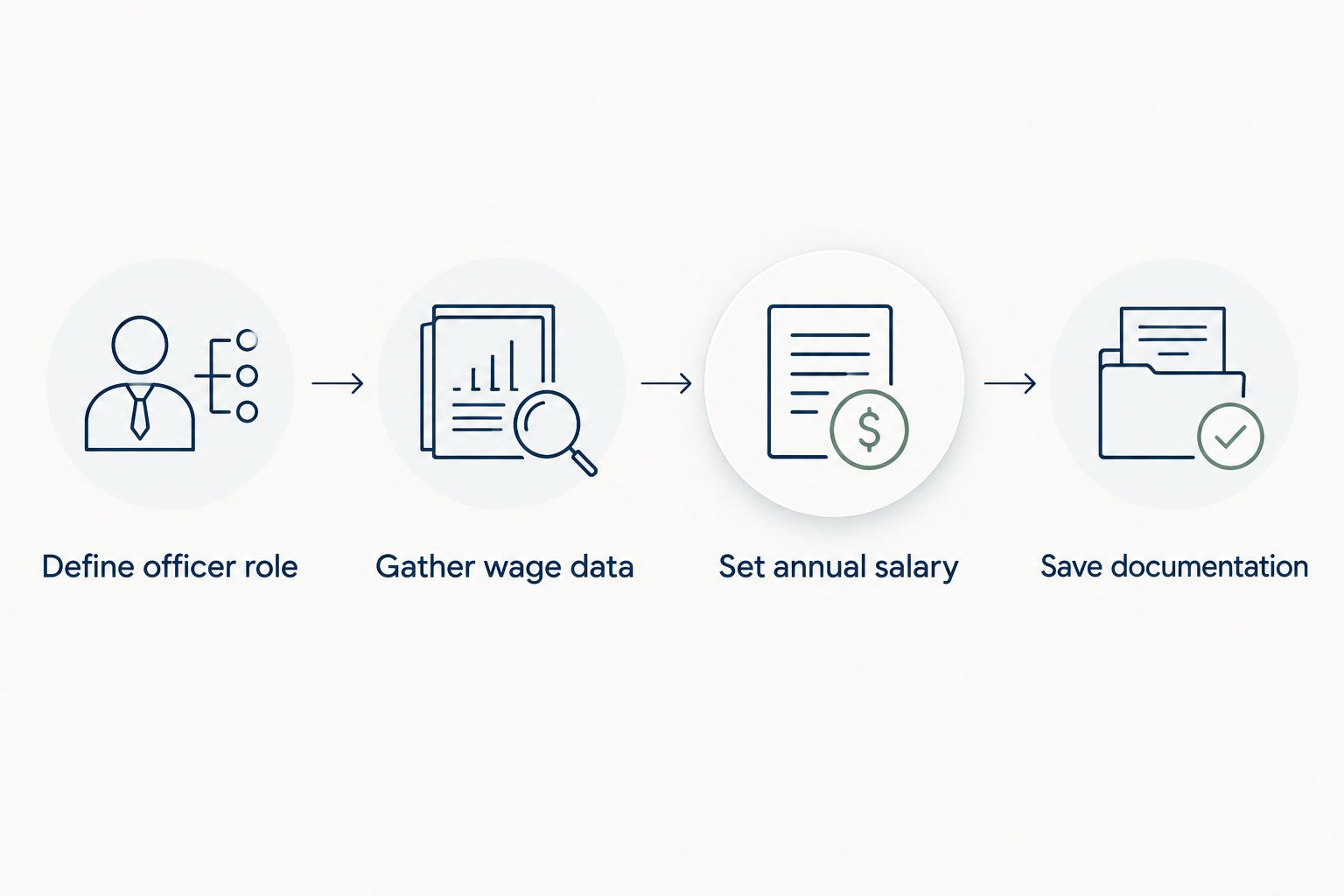
Expected result: The 2026 file contains a stated salary, supporting wage data, the officer's role and time commitment, and an explanation another tax professional can follow without interviewing the owner.
Configure and run payroll
- Go to Payroll, select Employees, and choose Run payroll.
- Confirm the correct pay period and pay date. The pay date controls the payroll quarter and tax year.
- Review the officer's gross salary for the period. Do not change gross pay merely to produce a preferred net deposit.
- Enter accountable-plan reimbursements separately from wages when the company has a valid plan and supporting records. Do not bury reimbursements inside officer compensation.
- Select Preview payroll and inspect federal withholding, Social Security, Medicare, state withholding, deductions, reimbursements, and employer taxes.
- Correct any zero-tax or exemption setting before selecting Submit payroll. Do not submit a known-bad payroll and plan to repair it with a bookkeeping entry.
- Save the payroll detail report and confirmation with the 2026 records.
The employee and employer portions of Social Security and Medicare generally total 15.3% before any Additional Medicare Tax. Employers begin withholding the additional 0.9% Medicare tax after an employee's Medicare wages exceed the federal withholding threshold, but employers do not match that additional tax.
Expected result: The paycheck reports gross officer wages, applicable withholding, employer payroll taxes, deductions, reimbursements, and net pay. QuickBooks also creates the related payroll liabilities and expense entries.
Reconcile the year-end compliance file
- Run the Payroll Summary and Payroll Details reports for January 1 through December 31, 2026.
- Reconcile gross officer wages to the payroll expense accounts in the general ledger.
- Reconcile federal tax liabilities to payroll deposits and Forms 941 for all applicable quarters.
- Compare annual Social Security and Medicare wages with Form W-2 and Form W-3 totals.
- Trace officer compensation to Form 1120-S, line 7. Investigate differences instead of forcing the tax-return figure to match an unreconciled ledger.
- Review shareholder distributions separately from wages, reimbursements, shareholder loans, and health-insurance adjustments.
- Save the reasonable-compensation analysis with the payroll reports and filed returns.
Form W-2 Box 1 and Form 1120-S line 7 do not always match automatically. More-than-2% shareholder health-insurance treatment and other tax items can create legitimate differences. The correct workflow identifies and documents each difference rather than posting an unexplained year-end plug.
Expected result: Payroll reports, Forms 941, Form W-2, Form W-3, payroll liability accounts, bank activity, and Form 1120-S form one traceable 2026 record. Every difference has a stated reason and supporting entry.
Use an outside payroll provider with QuickBooks
An external payroll provider can process officer compensation while QuickBooks remains the accounting ledger. The compliance duties do not change; only the source of the payroll entries changes.
| Workflow | Best for | Advantage | Limitation |
|---|---|---|---|
| QuickBooks Online Payroll | Businesses keeping payroll and bookkeeping in one system | Payroll transactions post directly into the accounting file | Direct posting does not validate the reasonable-compensation figure |
| Outside payroll provider plus QuickBooks | Businesses using a separate payroll platform or payroll service | Payroll administration stays with the selected provider | Imported or summarized entries require a separate reconciliation |
For the outside-provider workflow:
- Create distinct general-ledger accounts for officer wages, other employee wages, employer payroll taxes, payroll liabilities, reimbursements, and shareholder distributions.
- Export the payroll register for each pay date.
- Record the complete payroll entry from the register, including gross wages, employee withholding, employer taxes, liabilities, and net pay.
- Match the net-pay amounts to the bank feed. Do not classify the bank withdrawal as the full payroll expense because net pay excludes withholding and employer taxes.
- Reconcile the provider's quarterly reports to Forms 941 and the QuickBooks liability accounts.
- Reconcile the year-end register to Forms W-2 and W-3 before the S-corp return is completed.
Expected result: QuickBooks shows the same payroll economics as the outside provider even though QuickBooks did not calculate the checks. Gross wages, taxes, liabilities, and net pay remain separately traceable.
Troubleshooting
The officer was set up as a contractor
Stop issuing nonemployee compensation for services performed as an officer. Create the W-2 employee profile, review the payments already made, and determine which payroll returns or information returns need correction. Changing the vendor name in QuickBooks does not correct federal payroll reporting.
Social Security or Medicare shows zero
Review the employee's tax settings and pay type before submitting payroll. An ownership interest does not create a general exemption from FICA tax on officer wages. Confirm that the payment is salary rather than a reimbursement, distribution, or non-taxable item.
Net payroll cleared the bank, but gross wages are missing
The bank feed captured net pay rather than the full payroll entry. Use the payroll register to record gross wages, employee withholding, employer taxes, and liabilities, then match the net amount to the bank transaction. Do not expense the same net payment twice.
Distributions are mixed with wages
Reclassify each transaction from source documents. Payroll belongs in wage and liability accounts; shareholder distributions belong in equity. Use receipt-tracking systems to keep reimbursements supported rather than treating every owner-paid expense as a draw.
One officer works across multiple entities
Document the services performed for each entity and avoid duplicating compensation for the same work. The multi-entity tax-planning guide explains why payroll, management fees, intercompany payments, and owner distributions must be reviewed together.
Customize your 2026 workflow
Add three controls once the base payroll works:
- Quarterly compensation review: Compare year-to-date wages, duties, hours, and distributions before each Form 941 is finalized.
- Separate reimbursement process: Require receipts and business-purpose documentation before reimbursing an officer outside payroll.
- Year-end cutoff review: Check unpaid payroll liabilities, shareholder health insurance, retirement contributions, distributions, and officer wages before the final 2026 payroll is submitted.
Elevated Tax Strategies combines S-corp tax planning, return preparation, and bookkeeping review for business owners who do not want payroll assessed in isolation. The useful question is not whether QuickBooks produced a paycheck. It is whether the salary, books, deposits, filings, and return tell the same story.
Review your officer compensation
Check the salary support, payroll records, bookkeeping, and tax-return treatment together.
FAQ
Does QuickBooks calculate reasonable compensation for an S-corp officer?
No. QuickBooks calculates payroll from the salary or hourly rate entered, but it does not decide whether that compensation is reasonable under federal tax rules. The company must document the figure using the officer's actual services and comparable wages.
Can an S-corp officer be paid as a 1099 contractor?
An officer who performs more than minor services is generally treated as an employee for federal employment-tax purposes. Paying that compensation on Form 1099 does not override the officer's employee status.
Can I record officer compensation with a journal entry instead of payroll?
No. A journal entry can correct account classification, but it cannot replace wage withholding, payroll tax deposits, Forms 941, or Form W-2. Compensation for officer services must pass through a compliant payroll process.
Should Form W-2 wages equal Form 1120-S officer compensation?
The figures must be reconciled, but they are not automatically identical in every case. Shareholder health insurance and other tax adjustments can create documented differences between W-2 boxes and Form 1120-S line 7.
How often should an S-corp officer run payroll in 2026?
Use a consistent payroll schedule that the company can maintain and that reflects when wages are paid. The schedule does not determine whether the annual compensation is reasonable, so both timing and amount need separate support.
Can an S-corp shareholder take distributions before paying wages?
An S-corp must pay reasonable compensation to a shareholder-employee before making non-wage distributions for the shareholder's services. Payments labeled as distributions can be reclassified as wages when reasonable compensation was not paid.
How are more-than-2% shareholder health-insurance premiums handled?
Qualifying premiums paid or reimbursed by the S-corp are generally included in the shareholder's Form W-2 Box 1 wages but excluded from Boxes 3 and 5. The company must follow the applicable plan and reporting requirements for the shareholder to claim the related deduction.
What records support quickbooks s-corp officer compensation?
Keep the officer's duties, hours, experience, location, comparable wage data, approved salary, payroll reports, tax deposits, Forms 941, Form W-2, distribution ledger, and Form 1120-S reconciliation. The file should explain both the compensation amount and how it was reported.
One last thing
A salary analysis can become stale even when payroll runs perfectly. Recheck the officer's duties, time, and comparable wages for 2026 before copying the prior-year figure, especially after adding employees, changing entities, or shifting the officer from production work into management.
Elevated Tax Strategies treats officer compensation as a tax-planning decision backed by payroll and bookkeeping records, not a field to complete after the year closes.